Crescent Bench Lab: Measuring ZK Presentations for Real Credentials (JWT + mDL)
TL;DR — I wanted a hands-on, reproducible sense for what Crescent “costs” in practice:
- How expensive is one-time setup (
zksetup) and credential proof step (prove) per parameter?- How fast is proof generation (
show) and verification (verify) once everything is set up?- How big are the resulting proofs?
Repo:
https://github.com/reymom/zkid-crescent-lab
0. What this project is (and what it is not)
This is a benchmarking harness, not a production integration:
- It vendors
microsoft/crescent-credentialsand uses its existing circuit + test-vector generation flow. - It runs Crescent’s CLI steps (
zksetup,prove,show,verify) under a uniform runner. - It writes clean artifacts (
results.csv, optionalsamples.csv, per-param metadata tables) and generates a small plot suite.
What it does not try to do:
- Build a full Issuer/Client/Verifier deployment like Crescent’s
sample/folder (useful context, but not necessary for benchmarking). - Make security claims about end-to-end credential issuance or browser-extension UX.
1. Background: what Crescent is doing (in one paragraph)
Crescent aims to give stronger privacy for existing credentials: you start from something common like a JWT (or an mDL credential), and you generate a zero-knowledge presentation that selectively reveals only what you want, while proving the rest is valid and signed.
If you want the full story, these are the best starting points:
- The paper: “Crescent: Stronger Privacy for Existing Credentials” (ePrint 2024/2013)
- Microsoft’s repo + circuit setup docs
- Christian Paquin’s write-up / talk notes (great “engineering mental model” companion)
(Links are in the References section at the end.)
2. Repository layout
The repo is intentionally small: one Rust crate + a few scripts + plotting tools.
zkid-crescent-lab/
  scripts/                # vendor + setup + vector generation + sanity testing
  src/                    # bench runner + outputs + stats + param metadata
  tools/                  # plot suite (separate venv)
  out/                    # all run artifacts + merged plots
  vendor/                 # vendored crescent-credentials (ignored in this tree)
Outputs you should expect after a run
Each run writes a folder like out/run_<timestamp>Z/:
out/run_.../
  meta.json               # basic run metadata
  results.csv             # aggregated rows (per param x step)
  samples.csv             # optional raw samples (per iteration)
  param_table.md          # per-param metadata (claims, pub IO, etc.)
  param_table.csv
And the plotting suite writes:
out/plots/
  merged_results.csv
  mean_ms_by_step.png
  show_p50_p95_mean.png
  verify_p50_p95_mean.png
  ... (optional additional plots)
3. Repro: exact steps I used
This project uses two Python environments, on purpose:
.venv/— “project Python” (used by the setup/vector scripts in the root context)..venv-tools/— “plotting Python” (pandas/matplotlib only; I keep it separate so plotting deps don’t leak into whatever Crescent tooling wants).
3.1 Vendor Crescent
From repo root:
./scripts/vendor_crescent.sh3.2 Setup Rust + Crescent build prerequisites
./scripts/setup_crescent.shIf you want a quick sanity check that the vendored Crescent CLI builds:
cd vendor/crescent-credentials/creds
cargo build --release --bin crescent
ls -la target/release/crescent
3.3 Setup Python (project scripts)
./scripts/setup_python.shThis creates .venv/ in the repo root and installs requirements.txt.
3.4 Generate / prepare test vectors
./scripts/setup_vectors.shThis is where Crescent’s circuit setup + vector generation happens for the benchmark parameters.
3.5 Run a quick sanity test
./scripts/test_crescent.shAt this point, the harness should be able to run run and bench.
3.6 Run the benches
The crisp mapping Crescent gives:
rs256: RSA-SHA256 JWT, hardcodes disclosure of email domainrs256-sd: RSA-SHA256 JWT, selective disclosurers256-db: device-bound RSA-SHA256 JWT, selective disclosuremdl1: device-bound ECDSA mDL, selective disclosure
I ran these:
cargo run --release -- bench --param rs256 --iters 30
cargo run --release -- bench --param rs256-db --iters 30
cargo run --release -- bench --param rs256-sd --iters 30
cargo run --release -- bench --param mdl1 --iters 30
This matches Crescent’s intended flow: setup once per parameter, then run show/verify repeatedly.
Important detail:
benchrepeatsshowandverify(30 times), but runs zksetup and prove once.
That’s not an accident — those first two are heavy and typically one-time-per-parameter operations. The repeated operations (client proof generation + verifier check) are where latency matters.
Benchmark environment
- Host: Ubuntu (Linux 6.8.0-90-generic, PREEMPT_DYNAMIC)
- CPU: Intel(R) Core(TM) i7-10510U @ 1.80GHz (4C/8T)
- Rust: 1.88 (pinned via rust-toolchain.toml)
- Vendored crescent-credentials: c639608
3.7 Plotting venv (tools only)
python3 -m venv .venv-tools
source .venv-tools/bin/activate
pip install -r tools/requirements-tools.txt
Then:
python3 tools/plot_suite.py --out outThat produces the images under out/plots/.
4. Harness design (what I actually built)
The Rust crate is deliberately boring: it’s a runner + output writer + stats.
4.1 Steps and policy
The harness runs Crescent as:
zksetup(once)prove(once)show(N times)verify(N times)
prove generates the Groth16 credential proof and stores client state.
It also handles a real Crescent footgun: for some parameters the test vectors already embed a presentation message. Passing --presentation-message in that case makes Crescent panic with “Multiple presentation messages”, so I suppress the flag when a heuristic detects that field in the test vector JSON.
4.2 Logging policy
Default behavior:
- No logs on success.
- Keep logs on failure (stdout/stderr dumped under
out/run_.../logs/). - You can force logs via
--keep-logs.
This keeps run directories clean while preserving evidence when something breaks.
4.3 Proof size measurement
After each successful show, the runner scans the relevant test-vectors/<param>/ folder for a newly created artifact (heuristic: filename contains “presentation” or “proof”, and mtime is newer than the step start).
It records the byte size and aggregates it.
That’s why artifact_iters is 30 for show, and 0 for the other steps.
5. Parameter metadata table (credential type, sig, claims, pub IO)
Each run writes a per-param metadata table to:
out/run_.../param_table.mdout/run_.../param_table.csv
For the blog, I keep one consolidated “human” table here.
Notes on fields:
- Claim count: the number of claims supported by the parameter config (this is the “Claims: 2 vs 10” distinction that shows up during setup).
- Public inputs/outputs: as reported by the circuit setup output for the parameter.
- Credential + signature: JWT typically maps to
RS256here; mDL commonly usesES256-style ECDSA.
| param | credential | signature | claim count |
|---|---|---|---|
| rs256 | JWT | RS256 | 2 |
| rs256-sd | JWT | RS256 | 2 |
| rs256-db | JWT | RS256 | 2 |
| mdl1 | mDL | ES256 | 10 |
Exact circuit IO + claim wiring is in out/run_.../param_table.md (generated by the harness).
6. Results summary
Here are the merged results I got from out/plots/merged_results.csv (latest run per param), plus proof sizes.
6.1 Runtime summary (ms)
Important: zksetup and prove have n=1, so p50=p95=mean by definition in this dataset. The meaningful distributions are show and verify (n=30).
| param | zksetup (ms) | prove (ms) | show p50 / p95 | verify p50 / p95 |
|---|---|---|---|---|
| rs256 | 27,606 | 25,606 | 17 / 19 | 8 / 9 |
| rs256-sd | 31,323 | 27,316 | 17 / 18 | 9 / 10 |
| rs256-db | 36,648 | 33,265 | 289 / 372 | 140 / 171 |
| mdl1 | 31,988 | 42,969 | 302 / 364 | 144 / 189 |
Note: show/verify iterations are measured after the initial setup, so they reflect steady-state behavior on this machine (not first-run compilation or cold-start provisioning).
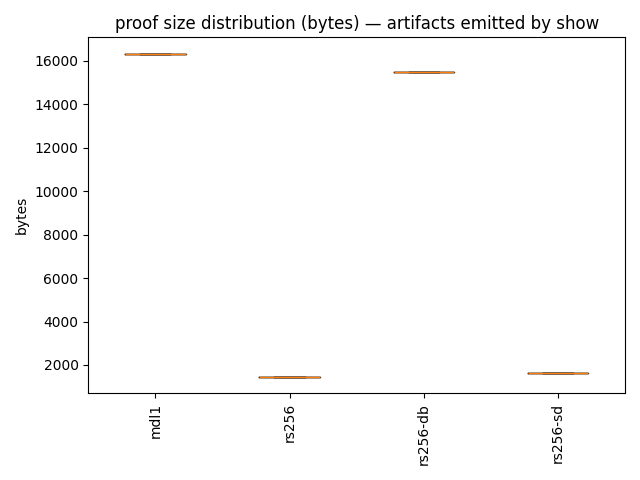
6.2 Proof size (bytes)
These are sizes of the artifact emitted after show (n=30, so the percentiles are meaningful).
| param | proof size p50 (bytes) | mean (bytes) | max (bytes) |
|---|---|---|---|
| rs256 | 1,437 | 1,437 | 1,437 |
| rs256-sd | 1,648 | 1,648 | 1,648 |
| rs256-db | 15,485 | 15,482 | 15,493 |
| mdl1 | 16,319 | 16,318 | 16,330 |
6.3 What I take away from this
A few observations that feel “portfolio-worthy” (and honest):
- The one-time steps are expensive, and that’s fine.
zksetupandproveare on the order of tens of seconds. In an actual system, those costs are amortized per parameter/schema. - Online costs (
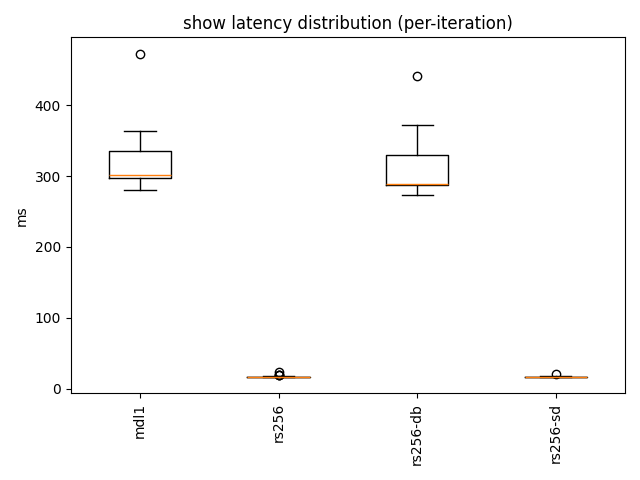
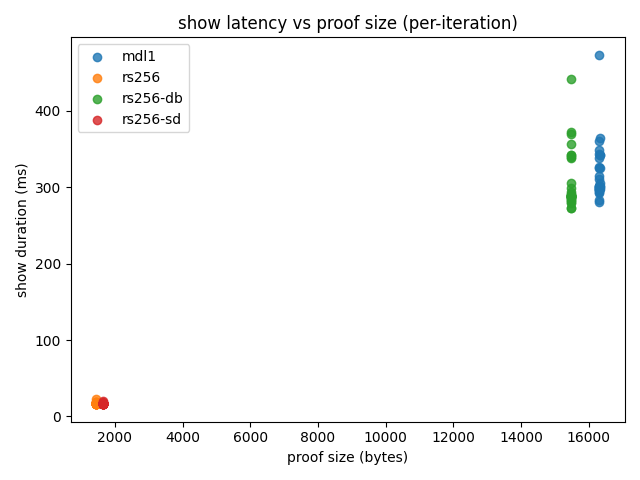
show+verify) are split into two regimes:rs256/rs256-sd: ~17ms show and ~8ms verify, with ~1.4–1.6KB proofsrs256-db/mdl1: ~300ms show and ~150ms verify, with ~15–16KB proofs That’s a clean “small proof / fast verify” vs “bigger proof / slower verify” split.
- The proofs are stable in size for these params.
In these runs, proof size variance is tiny (especially for
rs256andrs256-sdwhich were literally constant).
6.4 Show latency distribution
show is the online path (client generates a ZK presentation; verifier checks it).
These are the only steps I repeated 30× per parameter, so these distributions are the meaningful ones.
6.5 Proof size (bytes) and the latency/size tradeoff
Crescent’s show step emits a presentation artifact; I record its byte size per iteration.
To sanity-check the relationship between proof size and proving latency, here is a per-iteration scatter:
6.6 Amortization: when do the heavy steps stop mattering?
zksetup + prove are one-time per parameter/schema costs (tens of seconds).
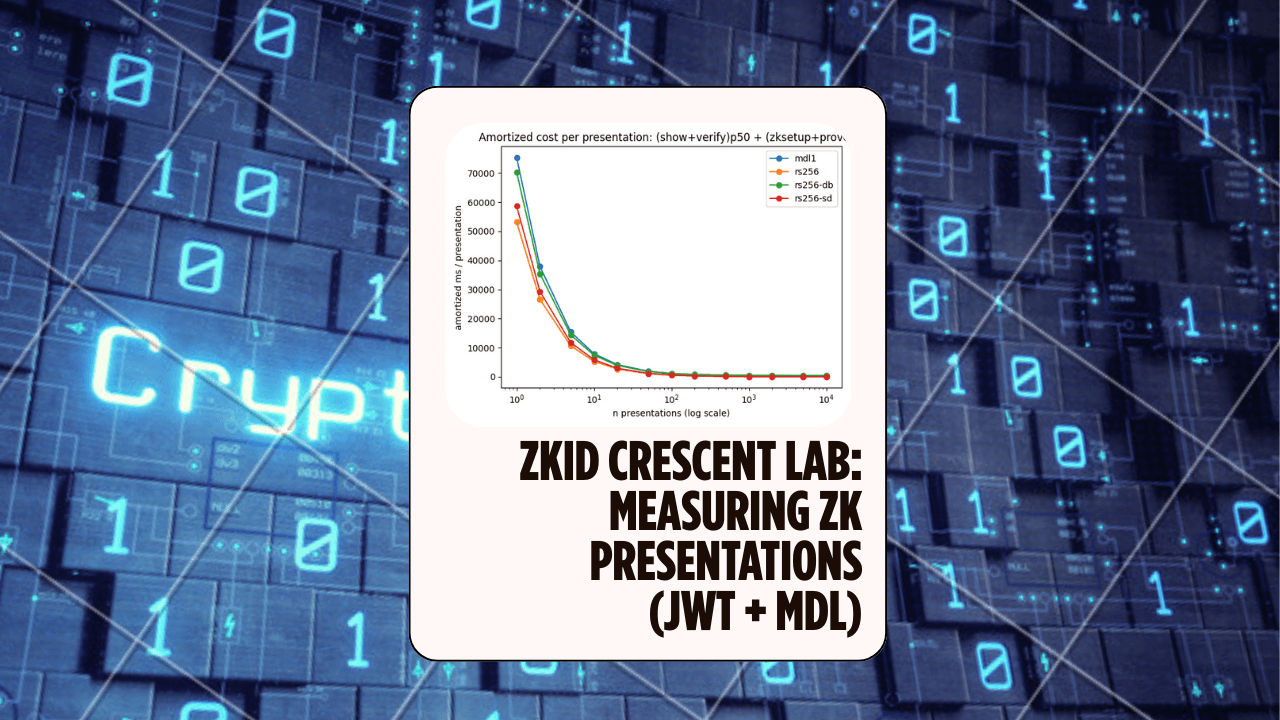
For actual deployments, what matters is the amortized cost per presentation:
amortized(n) = (show+verify)p50 + (zksetup+prove)/n
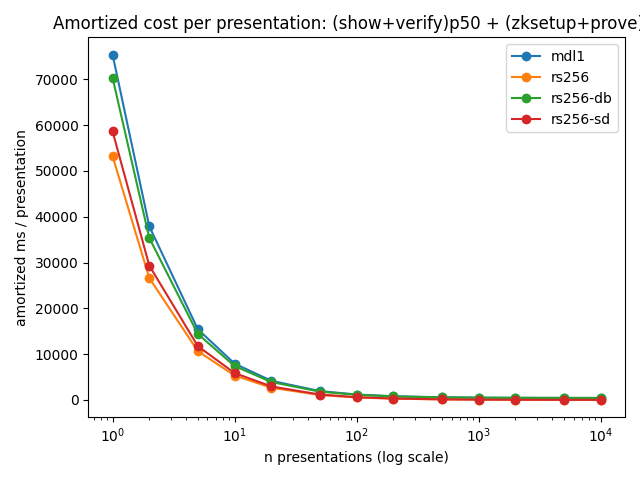
Offline cost (one-time per parameter) is ~53–76s here, while online cost (p50 show+verify) ranges from ~25ms (rs256/rs256-sd) to ~450ms (mdl1/rs256-db).
The amortization curve below shows how quickly the one-time cost becomes negligible after repeated presentations.
9. References
- Repo (this lab): https://github.com/reymom/zkid-crescent-lab
- Crescent credentials repo: https://github.com/microsoft/crescent-credentials
- Crescent circuit setup docs: https://github.com/microsoft/crescent-credentials/blob/main/circuit_setup/README.md
- Crescent paper (ePrint): https://eprint.iacr.org/2024/2013.pdf
- Christian Paquin write-up: https://christianpaquin.github.io/2024-12-19-crescent-creds.html
# related
A DarkFi Node on a Raspberry Pi — ARM Bring-Up Notes and the Circuits Underneath
Notes from turning a Raspberry Pi 5 into a 24/7 DarkFi testnet node and miner: NVMe boot, self-hosted WireGuard, the ARM dependency trail for darkfid and xmrig, and a look at the ZK circuits the node deploys on startup — including the v3a exploit that sat on a Poseidon binding.
ZKML EZKL MNIST Lab: Verifiable Inference, Quantization, and the Prover Memory Wall
A small, reproducible ZKML lab: train a CNN, export ONNX, compile an EZKL circuit, generate keys, prove & verify inference — then benchmark the practical tradeoff that matters on consumer hardware: numerical fidelity vs prover memory / PK size.
Baby-Ligero: Three Tiny Tests for a Tiny Circuit — ZK Hack S3M5
A mini Rust lab that implements a baby version of Ligero's three tests — proximity, multiplication, and linear — for a tiny arithmetic circuit, and uses them to see soundness amplification in action.